Hull Rupture Power Guide: Energy and Upkeep
How Hull Rupture's energy economy works: generator staffing, module upkeep, brownout recovery, and when to stop building before the ship stalls.
Energy is the first system that teaches Hull Rupture's central lesson: a module is not free after you build it. Production rooms consume energy while they run, and the generator that supplies that energy needs humans. Build too many rooms too quickly and the ship stalls, not because the aliens broke it, but because the economy ate itself.
The developers have described this as one of the run's core failure modes. The fix is not a bigger generator in every case; it is a power budget you actually check before expanding.
"Overbuilding too early can doom an entire run. You may end up with multiple production modules and not enough energy."
— Official source: Hull Rupture Devlog #1
For the income side of the budget, read resources; for the layout that creates the demand, read hull construction.
If energy hits zero while aliens are on the hull, turrets and repairs stop. Keep one generator's worth of headroom before the next wave.
Energy vs power
The game uses "energy" as a resource, but it behaves like power in a factory game. It has three roles:
- Construction cost. Early hull blocks and some installations are paid in energy.
- Upkeep. Production modules draw energy while active.
- Repair input. Repairs and some upgrades consume energy.
That combination means energy is both a stockpile and a flow. You can bank it for a big build, but you cannot bank your way out of negative upkeep. If income is lower than draw, the reserve drains and the ship browns out.
The generator is the only confirmed source of continuous energy. It produces on a timer as long as humans are assigned. The demo's timer was about 20 seconds per payout; the exact rate scales with staffing and modules.
How generation works
A staffed generator is the beating heart of the ship. Unstaff it and the entire economy stops, even if every other room is full of workers.
Three variables matter:
- Humans assigned. More workers means more output, up to the room's capacity.
- Adjacency bonuses. A generator next to the Despot's Chamber or a buff module produces more per cycle.
- Uptime. A damaged generator produces nothing until repaired, and a generator destroyed by a breach can end the run.
The generator should be the most protected room after the Despot's Chamber. Put it near the center, keep a repair path short, and do not surround it with rooms that block turret lines.
What consumes energy
Every active production module is a draw. The exact consumption is shown in the module's tooltip; the pattern is what matters:
| System | Draw | Can you turn it off? |
|---|---|---|
| Production modules | Continuous | Demolish or leave unstaffed |
| Hull construction | One-time | Skip the block |
| Repairs | One-time | Delay non-critical repairs |
| Turrets | Continuous or per-shot | Move or power down |
| Engines | Fuel plus workers | Stop traveling |
A room that is built but unstaffed may still draw standby power. That is the worst state in the game: a cost with no output. If you cannot staff a module, do not install it yet, or sell the kit.
Turrets are a special case. They are your survival, not your income, so they get priority when the grid is tight. A brownout that disables a turret during a wave is worse than a brownout that pauses a Mineral Generator.
Reading the energy bar
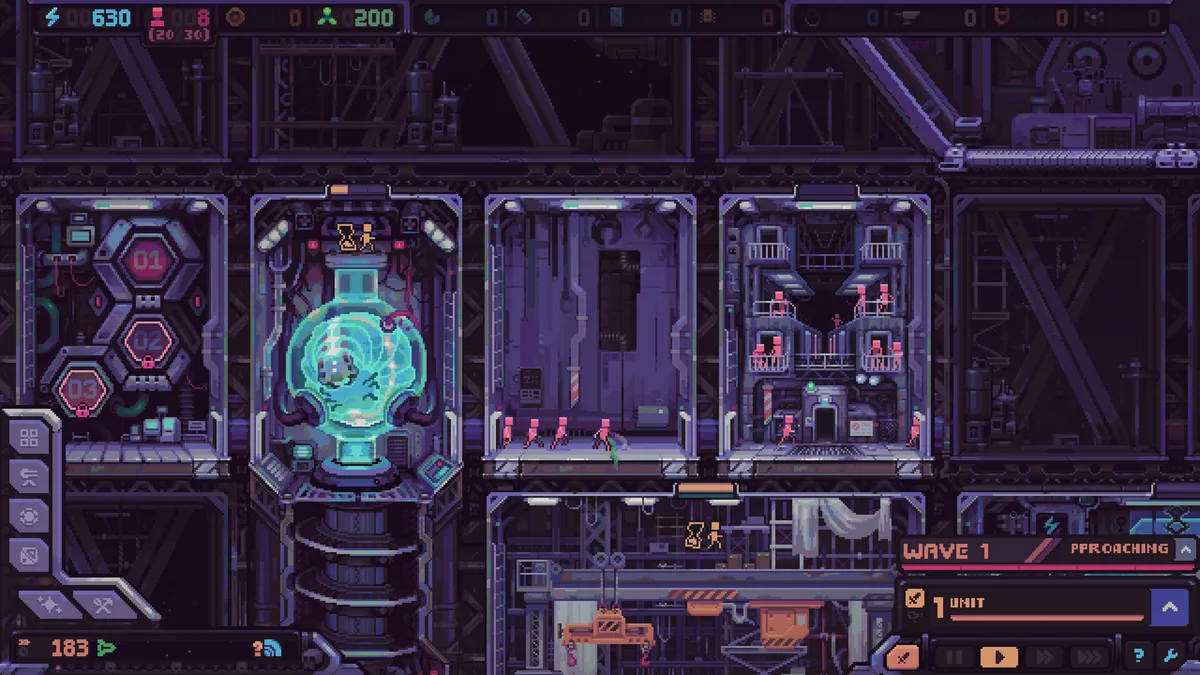
The top bar shows your current energy and the trend. A flat bar with positive income is healthy. A bar that dips every few seconds is a sign that a new module is cycling on and off.
Watch for these patterns:
- Full bar, negative trend: you are spending down a reserve. Fine before a planned build, dangerous before a wave.
- Empty bar, positive trend: you just recovered from a brownout. Do not immediately build; let the reserve refill.
- Bar oscillating: upkeep and income are too close. Add generation or remove a room before the next wave.
- Bar empty during a wave: turrets may be offline. This is an emergency; repair the generator or reassign humans immediately.
The interface shows per-minute income in Info Mode. That number is a current rate, not a forecast, so check it after every staffing change.
A simple power budget
You do not need exact numbers to avoid a stall. Use a ratio method:
- Count your active production modules.
- Count your staffed generators.
- If a new module would make the ratio worse than your current stable state, add generation first.
- Keep one generator's worth of energy in reserve before a boss wave.
The ratio changes with module tier. A Microchip producer costs more than a Mineral Generator, and a Reproducer may cost more than either. When you install a high-tier room, assume it needs a dedicated generator until proven otherwise.
A practical opening: one generator supports the Reproducer, one Mineral Generator, and the first turret. The second generator comes before the third production module, not after.
Recovering from a brownout
A brownout is not a loss yet. The recovery order is:
- Unstaff non-critical rooms. Move humans from production to the generator.
- Pause construction. Do not place the hull block you were saving for.
- Repair the generator. If it is damaged, this comes before any production.
- Sell an unwanted kit. Tokens are less useful than energy in a brownout.
- Demolish a redundant module. This returns resources and reduces draw, though not the kit.
Do not build a second generator while the first is damaged. You will spend energy you do not have to duplicate a broken source.
Power and hull construction
Hull blocks cost energy at first, then Plasteel later. That makes early expansion a power decision, not just a spatial one. Every block you place before the first generator upgrade is energy that cannot go into a module.
The safe pattern is to expand immediately after a wave, when you know the next wave's needs, and to keep enough reserve for one repair. If the block would leave you below that reserve, skip it. Skipping costs resources too, but less than a brownout during a wave.
Late game, the constraint shifts from energy to Plasteel. Keep the energy budget stable and let the advanced material gate your expansion. A ship with a healthy grid and no Plasteel is merely slow; a ship with Plasteel and no power is dead.
Sources and further reading
Related
- The full resource and upkeep picture
- Which modules draw the most energy
- Why extra hull raises the energy bill
FAQ
How often does the generator produce energy? The demo produced a payout roughly every 20 seconds. The rate scales with staffing and modules.
Do modules consume energy continuously? Active production modules draw energy while running. The exact draw is shown in the module tooltip.
What happens when energy runs out? Modules lose power and production stops. Turrets may go offline, which is why a brownout during a wave is dangerous.
Should I build a second generator early? Usually before the third production module. It is cheaper than recovering from a stall.
Does energy carry between runs? No. Energy is per-run; artifacts are the persistent progression.
More Hull Rupture Guides
How Hull Rupture's hull construction works: the 15-block deck, placement rules, stilt corridors, costs, and layouts that survive late waves.
Hull Rupture treats humans as a resource. Learn where to assign them, when to convert them in the Bioreactor, and how to avoid a population death spiral.
How Hull Rupture modifiers and artifacts work: shop vs event pools, confirmed effects, conditional bonuses, and which builds are worth committing to.
Hull Rupture module guide: confirmed production rooms, adjacency bonuses, module kits, selling duplicates, and placement rules for a stable ship.
Hull Rupture launches on PC, Mac, and Linux on November 4, 2026. There is no PS5, Xbox, Switch, or mobile version. Here is the full platform status.
Hull Rupture has no full reviews yet. Here is what the April preview build praised, what it criticized, and how the demo's reception frames the launch.
Hull Rupture releases November 4, 2026 on PC, Mac, and Linux. Here is what Steam has confirmed about the price, launch time, demo, and day-one content.
How repair works in Hull Rupture: breach priority, energy costs, repair module placement, and when to abandon a damaged section instead of rebuilding it.