Hull Rupture Beginner Guide: First Run Setup
Practical Hull Rupture beginner guide: opening build order, human assignments, energy, first modules, defense, and the mistakes that end runs before wave 10.
Hull Rupture gives you a ship, a handful of disposable humans, and a countdown to the first alien wave. The interface explains the buttons; it does not explain that your economy is the real health bar. Most first runs end because the ship cannot replace what the aliens destroy, not because the turrets are badly aimed.
This guide is written from the demo build and the developers' published systems notes. Full-release balance will move, but the opening logic is stable: generate energy, secure one production chain, place defense around the airlock, then expand only when the next wave is already covered.
"The optimal strategy is usually to invest the bare minimum into survival and funnel everything else into economy growth."
— Official source: Hull Rupture Devlog #1
What you actually control
You are Despot, an AI installed at the center of the ship. You do not control individual crew in combat. You assign them to rooms, choose which modules to build, decide where the hull grows, and pick rewards between waves.
The ship has three layers that matter:
- Hull: the physical outline. Aliens cut through it and walk toward the airlock. Losing the airlock loses the run.
- Modules: rooms that produce resources, house humans, repair damage, or buff neighbors. They occupy slots inside the hull.
- Systems: energy, weapons, shields, engines, and the Despot's Chamber. These are the pieces you protect first.
Humans are the input for almost everything. They staff generators, reproduce in the Reproducer, get converted to fuel in the Bioreactor, and can be spent in events. Treating them as people is a roleplay choice; treating them as throughput is the correct mechanical choice.
The first ten minutes
The opening is a race to make energy before the first wave, then convert that energy into a resource that compounds.
- Staff the energy generator. Energy is produced per assigned human on a timer. Without staff, nothing else runs.
- Build one Reproducer. More humans means more energy, more module staffing, and more bodies for the Bioreactor. It is the only worker multiplier you have.
- Scout the first shop before spending. Post-battle crates are themed. A cheap Defense crate is not automatically better than a production module you can use for ten waves.
- Place one turret covering the airlock approach. Do not spread turrets across the whole hull on wave one.
- Save one module's worth of energy. The first emergency repair is cheaper than rebuilding a destroyed room.
The demo's attack timer runs roughly every three minutes, with 20 waves in a Classic run. That is enough time for two or three build decisions between fights, not enough time to rebuild an entire production district.
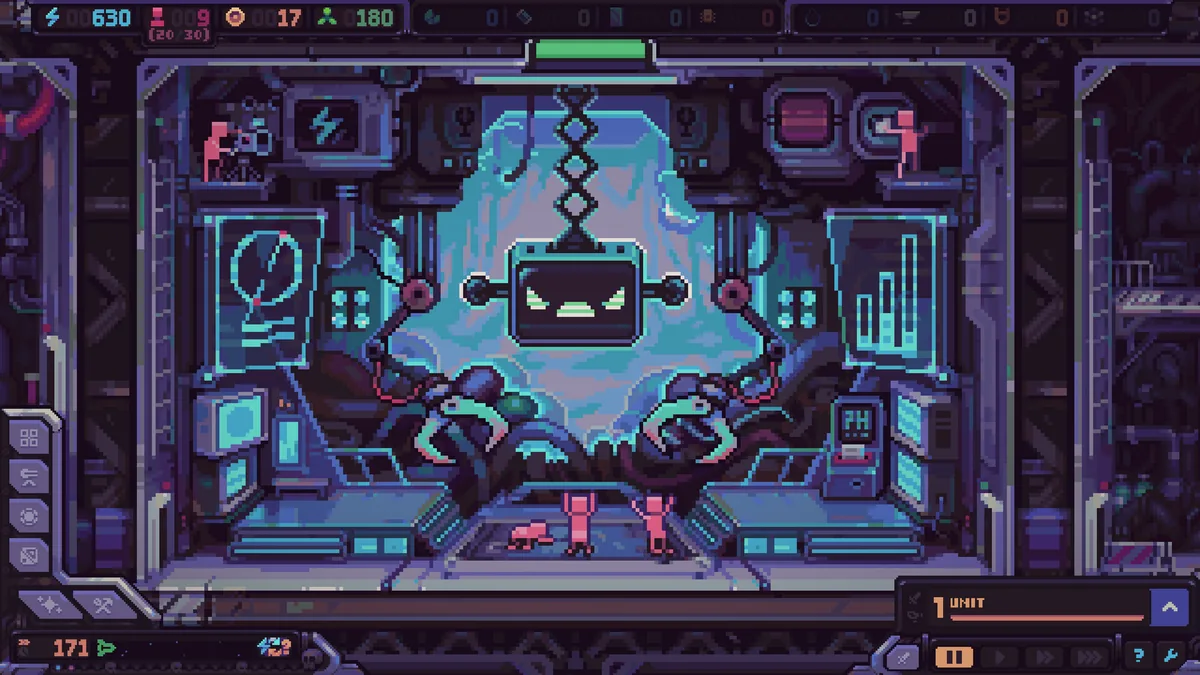
Your first production chain
Do not build one of every resource. Pick a chain and make it dense.
A reliable opening chain is humans → energy → minerals → modules. Minerals feed construction, construction opens slots, and slots let you place the modules that produce the next resource. The chain is short, uses rooms you already have, and does not depend on a rare galaxy node.
| Stage | Bottleneck | What to build next |
|---|---|---|
| 1 | No energy | Staff generator; add a second human if the room allows |
| 2 | Not enough workers | Reproducer, then housing or a second generator |
| 3 | No building material | Mineral Generator next to its booster |
| 4 | Waves outscale turrets | One long-range turret with a clear lane |
| 5 | Ship too heavy to travel | Engines, or stop adding empty hull |
Adjacency matters. Certain modules buff neighboring rooms, and the Despot's Chamber improves the efficiency of modules near it. A compact block of boosted rooms beats a scattered ring of unboosted ones, even if the scattered layout looks safer.
The opposite is also true: a module placed far from its support network costs more energy to reach, more hull to connect, and more turrets to cover. Every extra hull segment is mass, and mass slows the ship.
Defense before the first wave
Aliens do not attack a single front. Drop pods land across most of the outer surface, and the route they take depends on where the hull extends. A long, thin ship gives them a long walk; a compact ship gives them fewer entry points but a shorter path to the airlock.
For the first run, use this default:
- One long-range turret on an open corner with line of sight across the approach.
- One short-range turret in the gap beside the airlock, where enemies bunch up.
- One repair module within range of the airlock and the generator, not at the far end of the ship.
- No decorative hull. Every block should connect a room you need or shorten a defensive route.
Bosses land at the far left or top of the ship, furthest from the airlock. That gives you time, but it also means boss fights happen away from your repaired core. A reserve turret or a movable turret with a clear lane is worth more than a second layer of armor on the wrong side.
The two pages that pair with this build order are hull construction and modules.
Hull blocks cannot be placed over the airlock or the engine. More importantly, a wall that forces aliens into a longer corridor also forces your own repair crews and turret coverage to stretch. Build the corridor because it creates a kill zone, not because it looks tidy.
How to read a run
A run is healthy when all three of these are true:
- Energy income covers the next build without draining the reserve.
- The last wave died before reaching the airlock.
- You have at least one resource chain that does not depend on a single room.
If one is false, fix it before adding a new system. If two are false, skip the shop and spend on the ship.
The post-battle shop is where runs quietly die. Themed crates look exciting, but a crate that adds a module you cannot power is worse than no purchase. Konfa's patch notes describe the shop as themed loot boxes for modules or turrets, with modifiers already installed on some drops. That means the crate is a gamble on synergy, not a guaranteed upgrade.
Skipping a purchase is a valid move. Saving tokens for a reroll, a key module, or a repair after a bad wave often beats buying the cheapest crate.
Five mistakes that end first runs
Building wide instead of tall. A large hull with unboosted rooms looks impressive and defends badly. Compact production plus a covered approach wins more runs.
Ignoring the Reproducer. Humans die in events, get converted to fuel, and get spent in the Cursed mode. If your population does not grow, your economy has a expiration date.
Over-investing in turrets. Turrets do not produce. A ship with ten turrets and no minerals loses the war of attrition after wave 10.
Repairing the wrong room. Repair priority is airlock, generator, Reproducer, then production. A cosmetic hull breach far from the path can wait.
Treating the galaxy map as a menu. Travel takes time, fuel, and engine capacity. Every detour is a wave you are not spending on production.
A simple opening build order
This is a safe sequence for Classic on the default difficulty, not a speedrun:
- Staff generator.
- Build Reproducer.
- Build Mineral Generator adjacent to the Chamber.
- Build one long-range turret covering the airlock lane.
- Take the first shop crate only if it is a production module or a turret you can power.
- Add engines before the third expansion.
- At wave 5, audit energy and repair coverage before adding a new resource.
If the run is still alive at wave 10, stop following a script. The ship's layout, artifacts, and galaxy route have more influence than any opening build. The beginner guide's job is to get you to the point where those choices matter.
Sources and further reading
Related
- How hull blocks and build mode work
- Which production modules to install first
- How to lay out turrets around the airlock
FAQ
How many waves are in a Classic run? Twenty. The campaign is built around 20 attack waves and 20 days, ending with a final boss.
Can I pause to build? Yes. Hull Construction pauses the game while you place a block, and the build mode can be entered during flight.
Should I sell unwanted modules? Yes. Unwanted module kits can be sold in the shop, and demolishing a module returns its resources, though not the kit itself.
Do artifacts carry between runs? Artifacts unlock across runs, which is the roguelite progression layer. Their exact effects and unlock order are still being tuned.
Is Trade mode easier for a first run? It is calmer. Trade removes alien attacks and replaces them with economic pressure, so it teaches production without teaching defense. Classic is the better tutorial for the full game.
More Hull Rupture Guides
Every confirmed Hull Rupture resource, what it feeds, and how to fix energy, fuel, minerals, and human shortages before they end the run.
How the Hull Rupture post-battle shop works: module and turret loot boxes, token spending, installation costs, and when skipping the shop is the better move.
The Hull Rupture demo is free on Steam and includes one ship plus two modes. Here is what changed, how long it runs, and whether progress carries over.
Hull Rupture has four difficulty levels. Here is what they change, how they interact with modes, and why Impossible is a mode rather than a difficulty setting.
How Hull Rupture's galaxy map works: star types, fog of war, travel speed, guarded nodes, and how to choose a route that fits your ship.
Hull Rupture has six modes at launch. Here is what Classic, Trade, Cursed, and Endless do, plus which modes are confirmed and which are still unnamed.
Hull Rupture module guide: confirmed production rooms, adjacency bonuses, module kits, selling duplicates, and placement rules for a stable ship.
Hull Rupture launches on PC, Mac, and Linux on November 4, 2026. There is no PS5, Xbox, Switch, or mobile version. Here is the full platform status.