Hull Rupture Hull Construction Guide
How Hull Rupture's hull construction works: the 15-block deck, placement rules, stilt corridors, costs, and layouts that survive late waves.
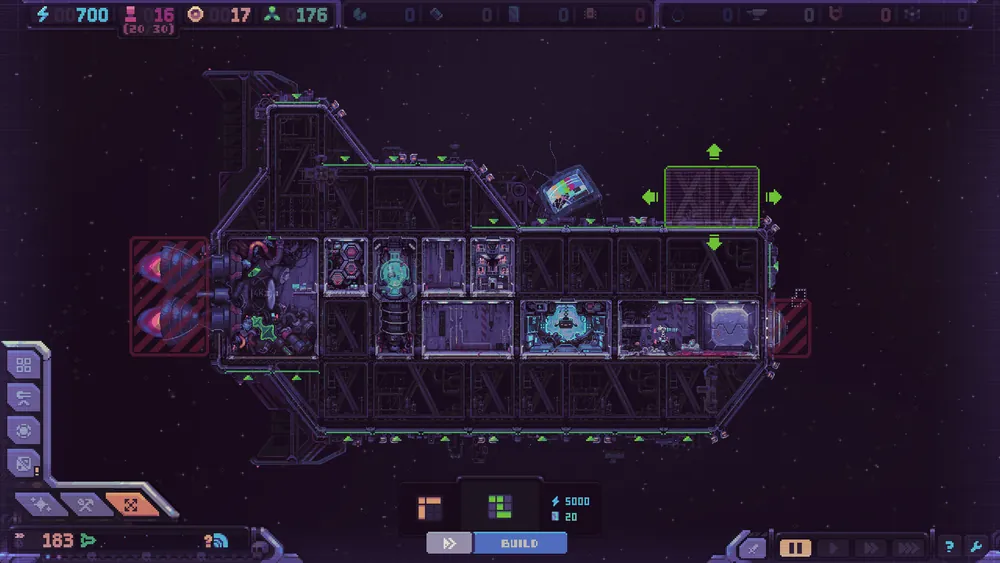
Hull Construction is the system that turns Hull Rupture from a room-management game into a ship-building game. You enter build mode during flight, the game pauses, and you place a hull block offered by the deck. The block becomes part of the ship permanently: it cannot be rotated, moved, or destroyed once placed.
That permanence is the point. Every block changes the ship's shape, mass, alien pathing, and turret coverage. A clever extension can turn a vulnerable airlock into a kill zone. A careless one can create a corridor that leads aliens straight to the room you cannot afford to lose.
"There are currently 15 different construction blocks available, and they are offered in a random order."
— Official source: Hull Rupture Devlog #4: Hull Construction
Pair this page with the module list and the defense layout before you place another block.
Use the pause to plan the next block against the upcoming wave, not to place a block reactively. The block cannot be removed once placed.
How build mode works
You can enter Hull Construction at any time during flight. The game pauses automatically, so there is no real-time pressure while you decide. The deck offers one random block at a time, and you choose where to attach it.
The rules are stricter than they first appear:
- A block cannot be rotated. Its shape is fixed.
- It can attach to any side of the existing hull.
- It can be placed a short distance away on stilts, creating a corridor between the new section and the ship.
- It cannot block the airlock or the engine.
- It cannot be destroyed once placed.
- An empty module slot becomes buildable only when a completed module is adjacent.
- Placing costs Energy first, then Plasteel later in the run.
- Skipping an offered block also costs resources.
The last two rules are the ones that punish indecision. You cannot window-shop the deck for free. Every offer is a small economic decision, even if you decline it.
The 15-block deck
Konfa has confirmed 15 construction blocks. The exact names and shapes are not all documented, but the deck is designed to offer variety before repetition: a block does not repeat until the full set has cycled.
That matters for planning. If you are waiting for a specific corner piece, you may see all 15 blocks before it returns. Build with what you are offered rather than holding resources for a perfect shape that may not arrive.
| Block property | What it means for your layout |
|---|---|
| Fixed orientation | You cannot flip a block to fit a gap; you must fit the gap around it |
| Any-side attachment | Blocks can extend the ship in unexpected directions |
| Stilts | You can create detached sections connected by a corridor |
| Permanent | A bad block is a permanent tax on mass and pathing |
| Slot-gated modules | New production requires a completed module next to the empty slot |
The deck is not a cosmetic builder. It is a constraint system, and the constraint is the strategy.
Cost and tempo
Early blocks are paid in Energy. Later blocks add Plasteel, which means the hull system becomes a drain on your advanced economy just as waves get harder.
That creates a tempo decision:
- Expand early to open module slots and production, while blocks are cheap.
- Expand late only when the new section solves a defense or production problem.
- Skip offers when the cost would delay a turret or a repair.
Skipping is not free, but neither is building. A block that adds mass without adding a room you can staff is worse than a skipped offer. The ship's travel speed depends on the number and level of engines and on total mass, so every empty hull segment makes the galaxy map slower.
The best time to build is usually right after a wave, when you have shop information and a clear idea of what the next wave needs. Building before a wave is a gamble on pathing; building after is a response to what actually happened.
Three layouts that work
There is no single best ship, but three patterns are reliable starting points.
The compact shell
Keep the hull close to the Despot's Chamber and the airlock. Place production in a tight block, with long-range turrets on the outer corners and short-range turrets in the gaps. Aliens have fewer entry points, and repair coverage is short.
The weakness is scaling. A compact ship runs out of module slots, and adding a new wing suddenly stretches the defensive perimeter.
The stilt corridor
Use stilts to place a detached section a short distance away, then connect it with a corridor. The corridor becomes a kill zone: aliens walk through it while your turrets fire from both sides.
The weakness is commitment. A corridor that is too long becomes a repair liability, and a boss that lands on the far side can cut the section off from the airlock.
The spiral
Players discovered a spiral layout outside the airlock that forces aliens to walk a long path while turrets fire inward. Konfa has acknowledged the "Despot's maze" pattern, and it is the strongest known use of hull geometry.
The weakness is cost. A spiral uses many blocks, adds mass, and requires enough long-range firepower to make the walk lethal. It is a mid-game pattern, not an opening.
Turret placement on a custom hull
Hull Construction changes turret math. A turret's value depends on how long an alien stays in its range, not on how much damage it deals per shot.
- Long-range turrets belong on open corners with a clear lane. They start firing before the alien reaches the hull.
- Short-range turrets belong in enclosed gaps where enemies bunch up. They compensate for low range with concentrated fire.
- Repair modules belong near the airlock and the generator, not at the far end of a new wing.
- A reserve lane matters for bosses, which land at the far left or top of the ship, furthest from the airlock.
Do not cover every side equally. Aliens land across most of the outer surface, but the route to the airlock is what decides the run. A turret on a side that no alien crosses is a decoration.
What not to do
Do not block your own repair path. A hull block cannot be destroyed, so a wall that separates the airlock from the repair module is permanent.
Do not build empty modules. An empty slot is only buildable next to a completed module. A chain of empty rooms is a chain of costs with no output.
Do not expand for the sake of the deck. The offer is random; the cost is not. If the block does not solve a problem, skip it.
Do not ignore mass. A heavy ship travels slower, reaches fewer galaxy nodes, and fights more waves on the road. The galaxy map is a resource, and hull bloat spends it.
Do not place a boss lane turret after the boss lands. Scout the far left and top of the ship before wave 10. If the boss can land there, the lane needs coverage now.
Sources and further reading
Related
- What goes inside the slots you create
- Where to leave turret corners and kill zones
- How the new hull changes repair coverage
FAQ
Can I rotate hull blocks? No. Blocks have a fixed orientation.
Can I destroy or move a hull block? No. Hull blocks are permanent once placed.
How many hull blocks are there? Fifteen at the time of the September 2026 demo update.
Can I build during a wave? Build mode pauses the game, and you can enter it during flight. It is not a combat ability.
What happens if I skip a block? Skipping costs resources, and the offer is gone. The deck continues with another block.
Does a bigger hull make the ship slower? Yes. Travel speed depends on engines and total mass, and more hull means more mass.
More Hull Rupture Guides
Hull Rupture treats humans as a resource. Learn where to assign them, when to convert them in the Bioreactor, and how to avoid a population death spiral.
How Hull Rupture modifiers and artifacts work: shop vs event pools, confirmed effects, conditional bonuses, and which builds are worth committing to.
Hull Rupture module guide: confirmed production rooms, adjacency bonuses, module kits, selling duplicates, and placement rules for a stable ship.
Hull Rupture launches on PC, Mac, and Linux on November 4, 2026. There is no PS5, Xbox, Switch, or mobile version. Here is the full platform status.
How Hull Rupture's energy economy works: generator staffing, module upkeep, brownout recovery, and when to stop building before the ship stalls.
Hull Rupture has no full reviews yet. Here is what the April preview build praised, what it criticized, and how the demo's reception frames the launch.
Hull Rupture releases November 4, 2026 on PC, Mac, and Linux. Here is what Steam has confirmed about the price, launch time, demo, and day-one content.
How repair works in Hull Rupture: breach priority, energy costs, repair module placement, and when to abandon a damaged section instead of rebuilding it.