Hull Rupture Defense Guide: Turrets and Layout
Hull Rupture defense guide: turret types, kill zones, airlock protection, boss landings, and how to build a defense that runs while you manage the economy.
Combat in Hull Rupture does not pause the factory. While aliens cut through the hull, humans keep working, resources keep moving, and modules keep producing. The design goal is that a prepared ship can fight without constant orders: your turrets handle the battle while you manage the economy.
That only works if the defense is built before the wave, not during it. A turret placed reactively is a turret firing late, and a kill zone assembled after the aliens land is a corridor full of enemies.
"If your ship is properly prepared, you should be able to ignore the battle entirely. Your defenses handle the fighting while you focus on expanding the ship and producing resources."
— Official source: Hull Rupture Devlog #2: Not Your Typical Tower Defense
For turret rankings, use the tier list; for keeping the line alive, read repair.
A turret on the outer hull that aliens walk past is decoration. Trace the path from the drop pod to the airlock and put guns on that line.
The four defensive layers
Hull Rupture's defense is a stack, not a single line.
| Layer | Job | Failure mode |
|---|---|---|
| Hull | Delay aliens and shape their path | A breach opens a shortcut to the airlock |
| Turrets | Kill aliens before they reach the core | No line of sight or no power |
| Defenders | Clean up leaks at the airlock | Committed too early, lost to a wave |
| Repair | Restore hull and modules between hits | Repairs too far from the breach |
The layers are meant to cover each other. Hull without turrets is a maze with no exit. Turrets without repair eventually lose coverage. Defenders without a chokepoint are a body count.
The airlock is the loss condition. Everything else can be rebuilt; a breached airlock ends the run. Build the defense around the route to it, not around the outer surface.
Turret types
The full release has more turrets than the demo, but the confirmed families are enough to plan a line.
| Turret | Range | Best use | Weakness |
|---|---|---|---|
| Long-range | Long | Open corners, boss lanes | Slow tracking, poor in tight gaps |
| Short-range | Short | Airlock chokepoints | Must be close to the fight |
| Beam | Medium | Sustained damage, Fragility builds | Needs a clear line |
| Rocket | Medium | Crowded lanes, burst damage | Slow reload |
| Rat Turret | Short | Converting a target into a rat | Unreliable against groups |
The Rat Turret arrived in the September 25 demo patch. It turns its target into a rat, which is funny until you realize it is a single-target control tool, not a wave clear. It belongs in a gap where one big alien would otherwise reach the airlock.
The Beam turret has a confirmed synergy: the Reproducer's Eyes modifier makes all Beam turrets apply Fragility. If you find that modifier, Beam turrets move up your priority list.
Placement: build kill zones, not walls
A turret's damage is only half its value. The other half is time on target: how long an alien stays inside its range.
Three placement rules cover most layouts:
- Long-range on open corners. A corner with a clear lane gives the turret the longest firing window and the widest arc.
- Short-range in enclosed gaps. Enemies bunch up in corridors, and short-range turrets punish the clump.
- Repair near the airlock. A repair room at the far end of the ship cannot save the room that matters.
The spiral layout is the strongest known expression of this logic. It forces aliens to walk a long path around the airlock while turrets fire inward. It is expensive and heavy, but it turns the ship's shape into damage.
Do not build a wall just to block a route. Hull blocks cannot be destroyed, and a wall that stops aliens also stops your repair path. Build the corridor because it creates a kill zone, not because it looks fortified.
Reading the next wave
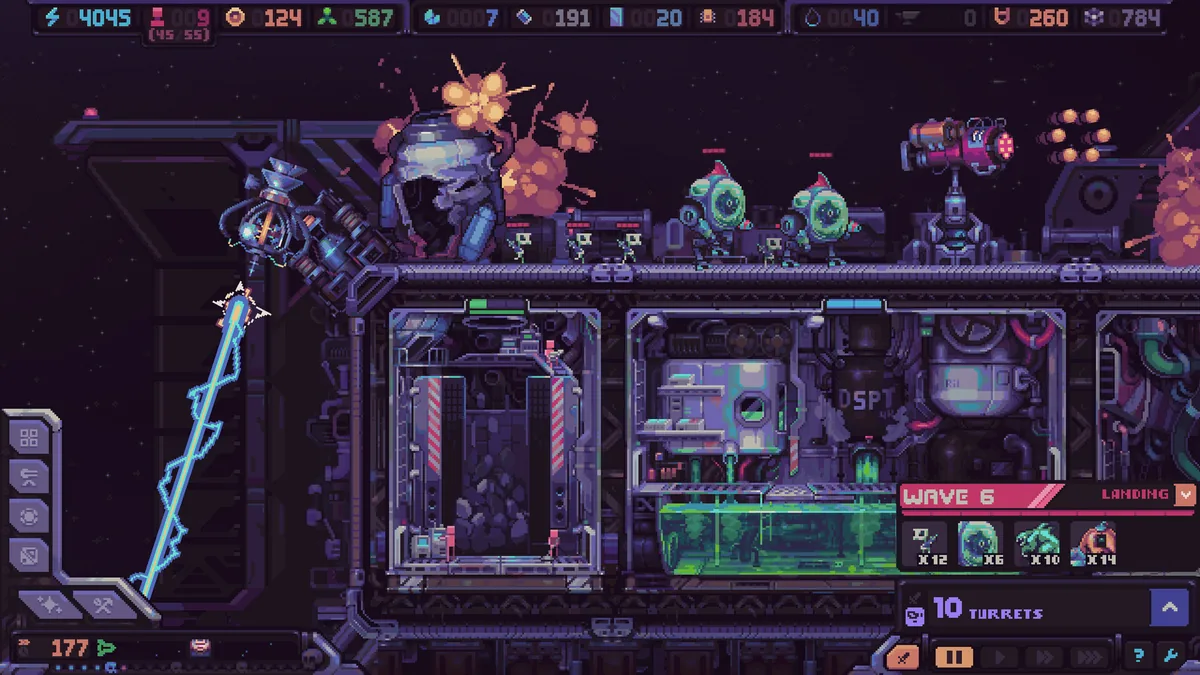
The game tells you how many enemies are coming, what type they are, and where they will land. The preview described this as a pre-wave readout, and it is the most important screen in the game after the shop.
Use it to answer three questions:
- Which side is the wave landing on? Move a turret or add coverage before the timer ends.
- Is the wave fast or slow? Fast enemies need short-range coverage near the airlock; slow enemies die to long-range lanes.
- Is there a boss? Bosses land at the far left or top, furthest from the airlock. Pre-build that lane.
Turrets can be moved for free, but the move takes a long time and leaves the turret with downtime. Moving during a wave is usually too late. Move after the previous wave, when the next landing zone is already visible.
Boss fights
Bosses are not bigger waves. They land away from the airlock and force you to fight on the outer hull, where repair coverage is thin.
Three preparations matter:
- A dedicated boss lane. Long-range turrets with a clear shot at the far left and top.
- A reserve repair. The boss will open a breach; the repair needs to reach it without crossing the ship.
- A defender squad. If the boss reaches the airlock, defenders are the last line. The patch notes describe turrets as first priority and airlock units as a last resort, which is the right order.
Guarded galaxy locations can trigger extra waves that do not count toward the Classic 20. Those waves are optional in the sense that you chose the node, but they are not skippable once triggered. Do not enter a guarded node with a damaged generator and no repair reserve.
The defense budget
Defense is a tax on production, and overpaying is as fatal as underpaying.
A workable budget:
- One long-range turret per approach lane.
- One short-range turret at the airlock.
- One repair module covering the airlock and generator.
- One mobile turret for boss lanes or emergencies.
That is enough for the first ten waves if the ship is compact. After wave 10, add a second layer only when the readout shows a wave your current line cannot kill.
Do not buy a Defense crate every shop. A new turret you cannot power is worse than a module that increases the economy. The best defense is often a stronger generator and a shorter repair path.
Sources and further reading
Related
- Which turrets are worth the slot
- How production pays for the defense
- How to keep turrets online after a breach
FAQ
Can turrets be moved? Yes, for free, but the move takes a long time and leaves downtime afterward. Plan moves between waves.
Do turrets need humans? No. Turrets are automated. Humans staff production, energy, engines, and the Chamber.
What happens if the airlock falls? The run ends. The airlock is the loss condition, which is why defense concentrates on the route to it.
Are there shields? The store mentions defense systems, but the demo's confirmed layer is hull, turrets, defenders, and repair. Treat shields as unconfirmed until release.
Do guarded nodes count toward the 20 waves? No. Guarded locations can trigger extra waves, and those do not count toward the Classic 20.
More Hull Rupture Guides
Hull Rupture treats humans as a resource. Learn where to assign them, when to convert them in the Bioreactor, and how to avoid a population death spiral.
How Hull Rupture modifiers and artifacts work: shop vs event pools, confirmed effects, conditional bonuses, and which builds are worth committing to.
Hull Rupture module guide: confirmed production rooms, adjacency bonuses, module kits, selling duplicates, and placement rules for a stable ship.
Hull Rupture launches on PC, Mac, and Linux on November 4, 2026. There is no PS5, Xbox, Switch, or mobile version. Here is the full platform status.
How Hull Rupture's energy economy works: generator staffing, module upkeep, brownout recovery, and when to stop building before the ship stalls.
Hull Rupture has no full reviews yet. Here is what the April preview build praised, what it criticized, and how the demo's reception frames the launch.
Hull Rupture releases November 4, 2026 on PC, Mac, and Linux. Here is what Steam has confirmed about the price, launch time, demo, and day-one content.
How repair works in Hull Rupture: breach priority, energy costs, repair module placement, and when to abandon a damaged section instead of rebuilding it.